MSP Global View
Once you manage more than one tenant, the Global View is the command centre across all of them - built for MSPs and anyone running several tenants, so you work the fleet rather than clicking through tenants one at a time.
What it shows
- Headline KPIs across the fleet: tenants, critical exposures, and the posture at a glance.
- Priority actions. The things worth doing now - admins without MFA, risky sign-ins, unused licences, tenants that need a consent refresh - each one opening a list of the affected tenants, worst first, with a link straight to the relevant report in that tenant.
- A tenant table, sortable and expandable, one row per tenant.
- Fleet trends over the last 30 days.
- Recent changes across tenants.
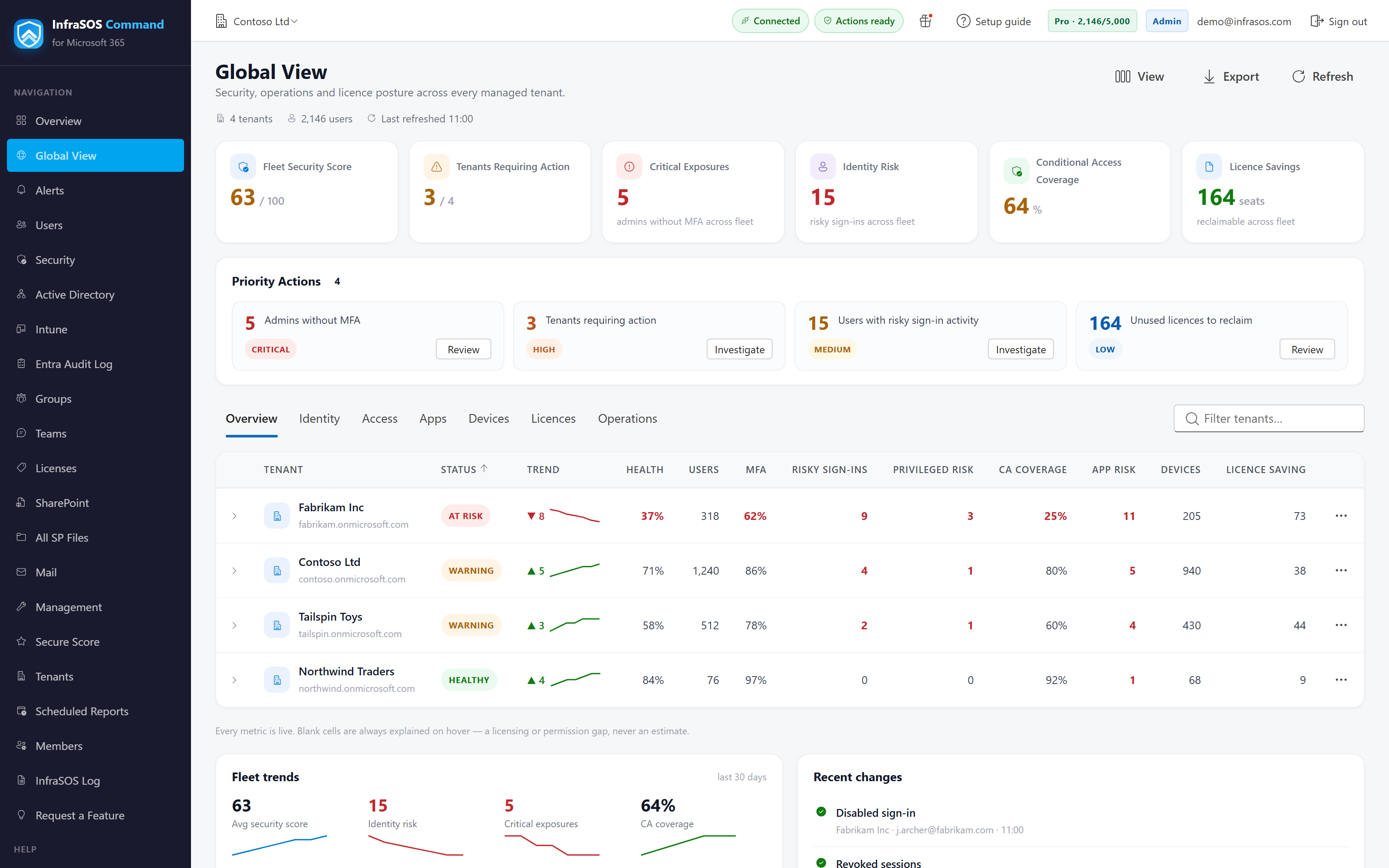
The Global View: priority actions and a sortable tenant table across the whole fleet.
The tenant columns
Each tenant row carries its posture at a glance:
| Column | Shows |
|---|---|
| Secure Score | The tenant's Microsoft Secure Score, with its 30-day change |
| MFA | MFA coverage |
| Conditional Access | Whether any policy enforces MFA and blocks legacy auth |
| Privileged risk | Administrators with no MFA capability |
| App risk | User-consented apps holding a sensitive delegated scope |
| Devices | Intune-enrolled devices |
| Change | The 30-day movement, as a sparkline |
Zero is not the same as unknown
A metric reads as a number only when it was actually computed. Where it could not be - a missing permission, a licence the tenant does not have, or Graph returning nothing - the cell is greyed Unavailable with the reason, and is never shown as a zero. A genuine zero (no risky users, say) reads as zero; "we could not check" reads as grey. The two are kept visibly distinct so a blank is never mistaken for good news.
Trends and history
Point-in-time columns are read live. The trend and change columns are built from a daily snapshot taken per tenant, so they begin to show movement once there are at least two days of history and fill out over the following month.
Drilling in
A priority action, or any tenant row, opens into that tenant: the Global View hands you off to the exact report that explains the number, in the tenant it belongs to, so investigating a fleet-level figure lands you where you can act on it.
Related: cross-tenant alerts
The Global View is the posture of the fleet now. For what has changed across the fleet - new administrators, risky users, thresholds crossed - and to be emailed when it does, see Alerts, whose own Global Alert View summarises the last 24 hours across every tenant.