Team and delegated access
365 Command is built for a team, not a single login. You invite colleagues into the console, give each a role that decides what they can do, and optionally scope them to particular tenants. It is invite-only: there is no open sign-up, and a person has no access until an administrator invites them.
This is not tenant consent
Roles here govern who on your team may use the console and what they can do in it. They are separate from the Microsoft Graph consent that lets the product read or manage a customer tenant - that is covered in Permissions.
The roles
| Role | Can |
|---|---|
| Admin | Everything: manage the team, connect and remove tenants, configure alerts and schedules, and run every management action. |
| Operator | Run reports and management actions on their assigned tenants, and manage alerts and scheduled reports. Cannot manage the team or connect tenants. |
| Viewer | Read-only. View reports, security posture, alerts and the Global View, but run no management actions and change no configuration. |
The person who first subscribed is the account's first Admin, so there is always someone who can invite the rest of the team.
Tenant scope
A member can be limited to specific tenants rather than the whole account. A scoped Operator sees and acts only on the tenants assigned to them; everything else - other tenants' reports, alerts and actions - is simply not theirs to see. Admins are account-wide. Use scope when a colleague or a customer-facing engineer should only touch part of the fleet.
Inviting a colleague
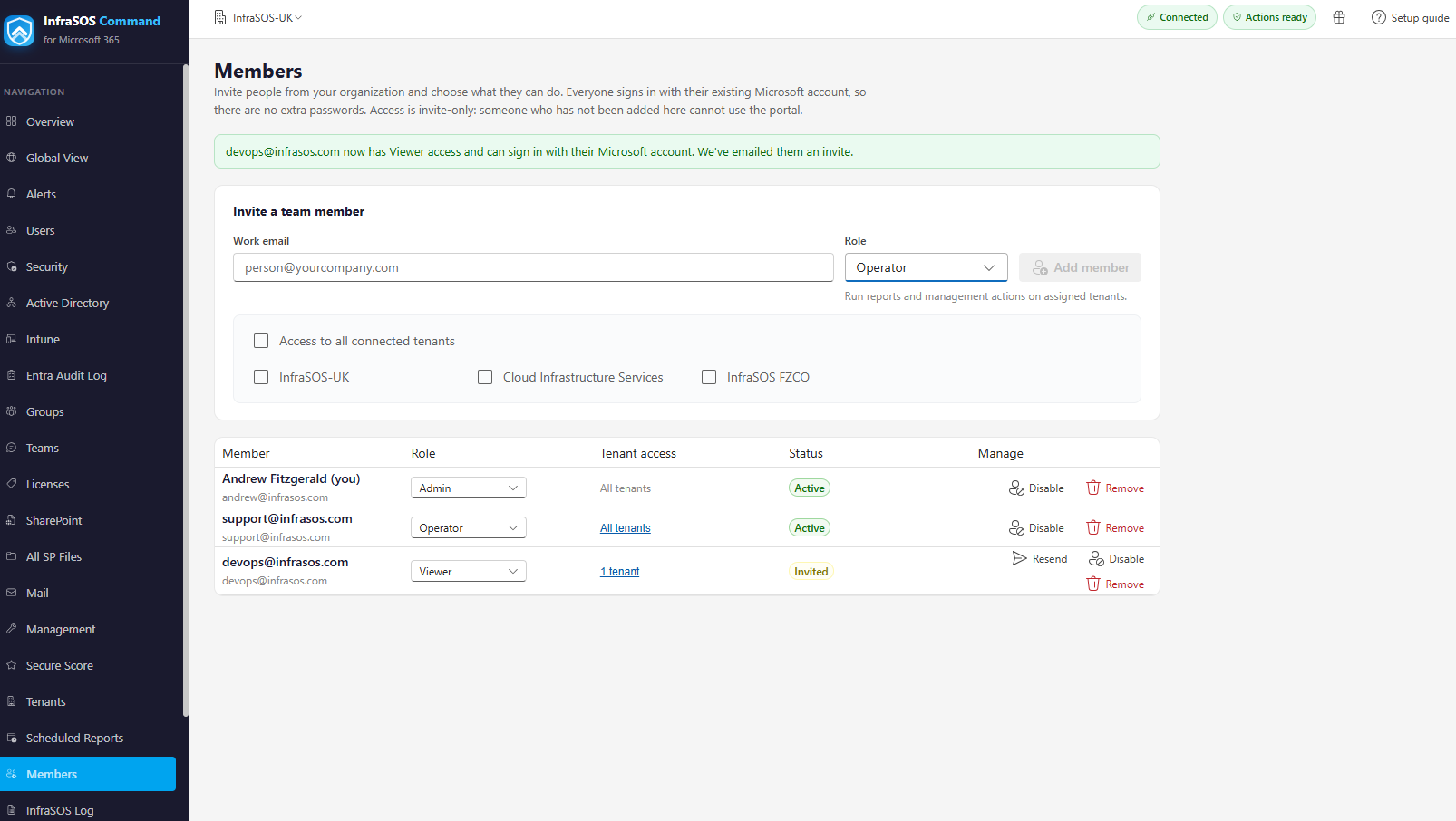
The Members page: invite a colleague with a role and tenant scope; the list shows each member's role, access, status and controls.
On Members (Admins only), invite by email, choose the role and, where it applies, the tenants in scope. The person receives a branded email invitation and, once they accept and sign in, appears in the list.
From the Members list an Admin can:
- Resend an invitation that was missed.
- Change a role or adjust a member's tenant scope.
- Remove a member, which revokes their access immediately.
What each role sees
The navigation adapts to the role, so people are shown what they can use rather than options that would only be refused:
- Members and tenant connection are Admin-only.
- Scheduled Reports is for Admins and Operators; Viewers do not see it.
- Alerts is visible to everyone, but creating profiles and acting on alerts is Admin and Operator only - Viewers see the dashboards and history read-only.
- Reporting, Security, Intune and the Global View are visible to every role; the per-row Actions that change a tenant are hidden from Viewers.
The console enforces every role and scope check on the server as well, so what a role cannot do it cannot do by any route, not only in the interface.